Attachments as reusable building blocks
Follow the inputs, bodies, ports, and clearances that let one attachment work in many frames.
On this page
A reusable part carries a contract#
A sleeve that fits one tube is useful once. A sleeve whose geometry follows a supported tube section can be reused across a family of frames. That is the purpose of an attachment type: define a local design once, then resolve it from the inputs of each placed instance.
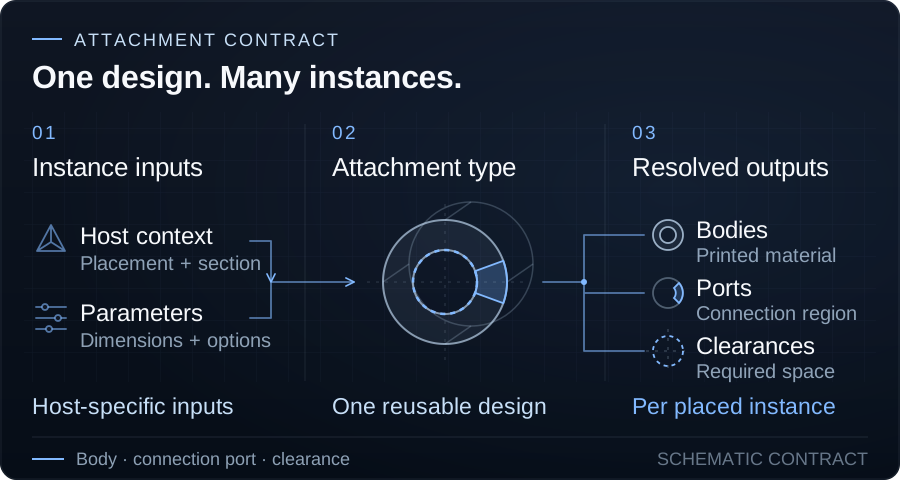
Its contract includes the placement context, parameter inputs, manufactured bodies, connection ports, and exported clearances. Reuse depends on those pieces agreeing; a visually convincing mesh alone does not describe how a part adapts or combines.
Choose the placement context#
- Physical: hosted by a real stock member. Use it for sleeves, clamps, and caps that depend on that member's supported section dimensions.
- Virtual: hosted by a reference axis without stock material. Use it when an axis should determine placement and orientation while the fitting supplies its own dimensions.
- Free: placed in world space without a parent link. Use it for a bracket, adapter, or enclosure; assembly mates can subsequently position it relative to another part.
These are placement and input contracts, not different ways of printing. Ports from all three contexts can participate in Attachment Connections when their owning body materials agree.
Dimensions follow the intended reference#
Physical attachment length, thickness, and offset can be absolute or relative to a profile-dependent reference length. For circular stock, that reference is the radius. A relative value is therefore not a percentage of the whole member's length.
Virtual attachments supply their own dimensions because their parent has no stock section. Free attachments use their own parameters and world transform. Choosing a context makes those dependencies explicit.
Profile support must also be explicit. A circular sleeve does not acquire a rectangular socket simply because you place it on rectangular stock. Choose a compatible type and inspect its resolved geometry.
Placement has an anchor and a direction#
Physical and Virtual link attachments are anchored from a node on their parent link. Offset moves the part along that link; direction decides which way it faces, and rotation controls roll around the axis.
Pinned to end derives the offset so the attachment stays flush with the nearest terminal end. The offset field is disabled while pinning owns that value. Turn pinning off when you need a manually chosen position or overhang.
Bodies, ports, and clearances have different jobs#
A body part supplies manufactured material. A connection port selects a region to connect and names its owning body. An exported clearance describes space that must remain empty in the connected geometry.
One body can expose several ports. Multiple bodies in one attachment do not automatically become one printed piece: a two-part clamp must keep its independent half independent unless you explicitly connect it.
This division lets a small port control connector shape without duplicating the entire body, while clearance tools protect required interfaces as neighboring material is added.
Authored material preferences#
The Attachment Editor's Materials tab lets each manufactured body specify a material and appearance preference. Leave a preference unset when the Frame default should choose it. When placement uses defaults, the body's authored preference takes priority over the relevant Frame fallback; an explicitly selected uniform material takes priority over those preferences.
Placed instances store concrete body assignments. Changing an attachment preference or a Frame default later does not recolor existing instances. Edit their body materials in the Frame when that is your intent. Geometry edits keep assignments for surviving bodies and initialize new bodies from their own preference or the Frame fallback.
The attachment preview shows the manufactured bodies with their preferences. An unset preference uses a neutral green preview. These choices remain part of the reusable design through history, publication, and editable sharing; connected Frame bodies must still satisfy material continuity.
Author a type, then reuse instances#
The Attachment Editor is where you author the parametric geometry and export its bodies, connection targets, and clearances. The Frame Editor places instances of that type and connects them in a particular structure.
Read Build parametric parts in the Attachment Editor for the editable CSG tree, Boolean operations, reactive inputs, and publication workflow.
A custom fastening idea becomes reusable when it expresses those contracts, not just the final appearance of one joint. Start by identifying its host inputs, the manufactured bodies that must remain separate, the regions neighbors should connect to, and the space they must leave empty.
For exact instance controls, see Physical-link attachments, Virtual-link attachments, and Free attachments.
Get occasional TrussLab updates, or send questions and build notes directly.
Subscribe to our newsletter